

01
A desk for your manuscript
Keep chapters, scenes, and saved versions within reach. Give your prose the space and attention it deserves.
A native writing studio
A local-first writing studio for novelists, worldbuilders, and picture-book creators. Write your manuscript, keep your lore close, and check continuity without scattering your story across a dozen tools.
Windows & Linux · Built in Rust · Your files stay yours
Inside the studio
A writing desk, a living codex, a creation forge. Explore the actual native app, not a mockup.
01 / Scriptorium
Your manuscript at the centre, with chapters close at hand. A parchment writing surface inside your own private archive.
Approved alpha snapshot · Native captures · Fictional sample project View downloads
Less juggling. More storytelling.
Here’s how the workspaces fit together, using the fictional sample project shown in the gallery.
Outline the chapter and decide whose eyes we see it through. Keep the relevant people, places, and lore in your World Codex.
Write in the Scriptorium. When you want AI assistance, inspect the story context in the Creation Forge and review its suggestions.
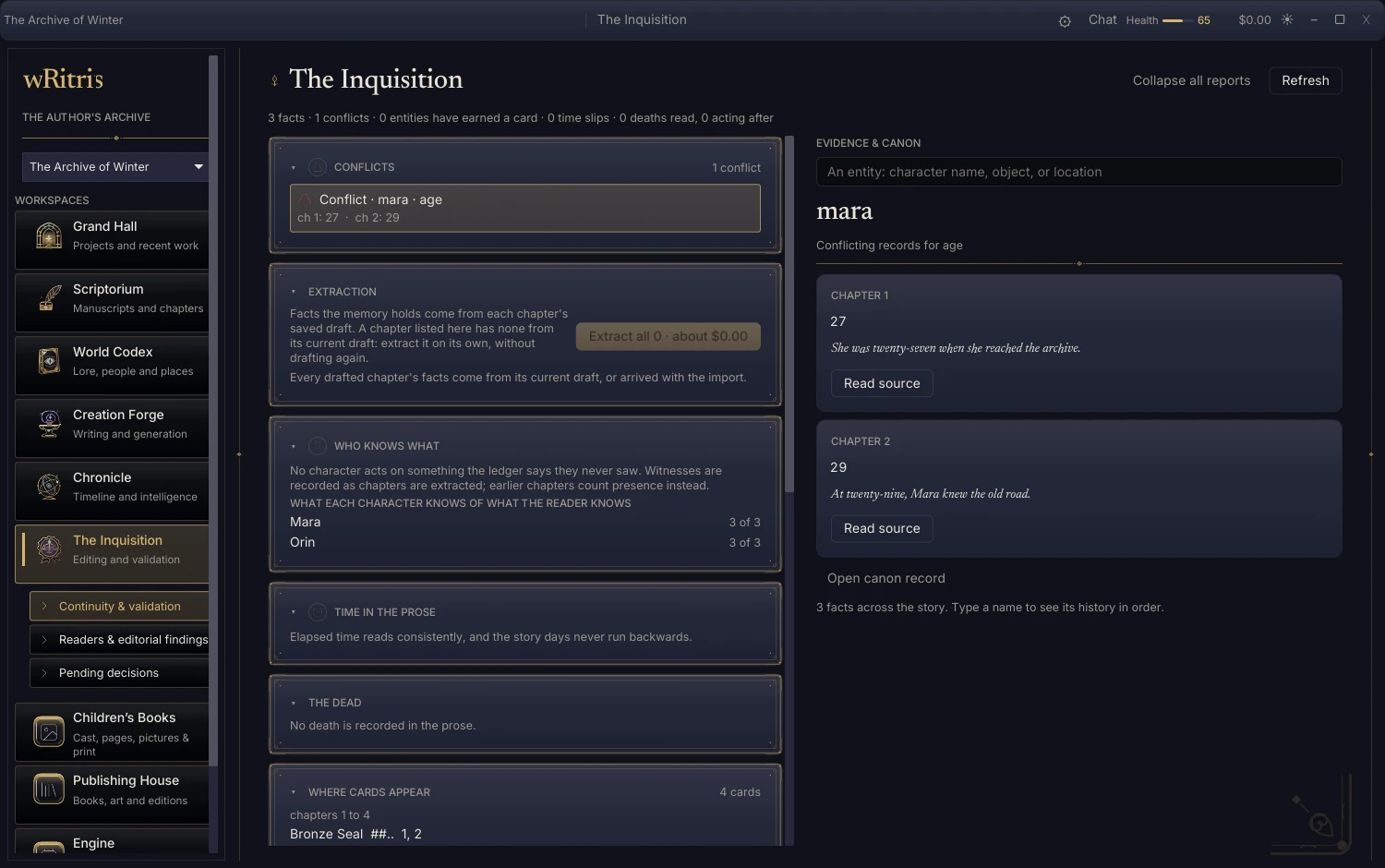
Mara is 27 in one record and 29 in another. The continuity workspace puts both records together so you can decide what needs changing.
Room for your whole imagination
From a single sentence to an entire fictional universe, a connected workspace for every part of the process.
Keep chapters, scenes, and saved versions within reach. Give your prose the space and attention it deserves.
Build a codex of characters, places, factions, and lore. Plan scenes and explore branching stories on the plot canvas.
Bring your premise, canon, and prose style into the Creation Forge. Inspect the context and review the results.
Track story facts, character knowledge, and continuity. Review conflicts with the evidence that raised them.
Read aloud and create narration with local Piper or Kokoro voices, or connect a supported cloud voice provider.
Prepare EPUB, Word, and paperback exports. Bring illustrations and publishing materials into the same workspace.
Projects are stored locally. Cloud AI is optional; when you use a cloud provider, selected context is sent to that provider. Local models and voices keep that work on your machine.
Latest development · Source and owner-local builds
Implementation progress beyond the public 0.1.3 security-only hotfix. A passing source or scripted native test is not customer usability, live-provider, platform-signing, or performance acceptance.
The linked public packages address the licensing incident. Seed Interview, deep Brainstorm, on-page chapter guidance (APP-19) and the open Plugins hub are separate future/local-development work—not features shipped by that hotfix. Private Mac evaluation and plugin prototypes are not public downloads.
Check actual accepted release formatsFor little readers. And big imaginations.
A dedicated children’s picture-book workspace—not just illustrations added to a novel. Bring the cast, page text, artwork, and book layout together.
Create references for characters, places, and recurring items. Approve and lock their looks, then use those references to guide page illustrations in your chosen art style.
Choose a reader age band, write page text and picture notes, and use optional AI help to draft or illustrate. Preview spreads and adjust how words sit beside or over the picture.
Listen with Read aloud, check the print layout, and export a paperback interior PDF or fixed-layout EPUB. Build the exports on your computer, without a model call.
AI illustration requires a configured image provider; provider charges are separate. Review artwork and exported layouts before publication.
Loading available releases…
Leave room for your next idea
Explore the writing desk, worldbuilding tools, available installers, and optional Core Lifetime Pro ($49) & craft plugin licenses.
Bring the studio home
App downloads require a Core purchase. Within the app, Grand Hall and World Codex work without an activation key; Scriptorium has a 3-day drafting evaluation. A Core key unlocks the full writing workspace. Unpublished builds are clearly marked.
Software downloads require a verified Core purchase or linked USD $49 Patreon Shop app purchase. Sign in or connect Patreon on your account page; the USD $5/month book-library subscription is separate. Your account and purchases
Setup wizard for Windows 10 / 11
Awaiting package acceptancePortable Linux application
Verified policy: Grand Hall & World Codex free forever · Scriptorium 3-day evaluation.
Sandboxed Linux package
Verified policy: Grand Hall & World Codex free forever · Scriptorium 3-day evaluation.
DEB package · check system requirements
Verified policy: Grand Hall & World Codex free forever · Scriptorium 3-day evaluation.
RPM package · check system requirements
Verified policy: Grand Hall & World Codex free forever · Scriptorium 3-day evaluation.
Separate native Apple Silicon and Intel app bundles are now built for private owner evaluation, with a compiled macOS 13.0+ target (Ventura, Sonoma, Sequoia). Public Mac access is still coming soon.
Private packages are architecture-specific .app ZIPs—not a universal app or DMG. Owner-VM GUI/Metal/input acceptance, Developer-ID signing, notarization and public release approval remain separate. No macOS download is published.
View licenses · macOS unavailableVersion-aware plugin and package help. The drafting evaluation begins on first app launch, not the website visit or download. Continued Pro/Alpha access follows your license term; see the pricing and FAQ for details.